2026-11-05 · 7 min read · James Pichardo
Leer en español →Your Defenses Look Green. Are They Working?
How Project Achilles runs real attack techniques on your own endpoints every day, and turns the results into evidence your SOC and your risk owners can both act on.
TL;DR
- Security dashboards report what is installed and enabled. They can't tell you whether a ransomware chain would be stopped on a given host today.
- Project Achilles answers that by running real MITRE ATT&CK techniques on your own endpoints, on a schedule, and recording what happened: blocked, seen, or missed.
- Every run lands on one of five verdicts. Each verdict combines the test's own exit code with alerts pulled from Microsoft Defender, CrowdStrike, SentinelOne and Sophos.
- The Defense Score keeps only the latest result for each test and host, so a fix shows up as soon as the test runs again.
- We built an interactive explainer that shows the whole loop in motion: docs.projectachilles.io/how-it-works.
A Pattern We Keep Seeing
It usually goes like this. An EDR is deployed on every endpoint, its console shows every agent healthy, and the quarterly report says coverage is fine. Then someone runs a credential-dumping test against a file server, and it completes without a single block.
Nobody did anything wrong. Months earlier, during an outage, that server's policy was switched to detect-only "for a day" and never switched back. The console stayed green the whole time, because it reports that the sensor is installed and running. It doesn't report whether the sensor stops anything.
That gap, between the coverage you assume and the coverage you have, is what Project Achilles measures.
Controls Drift, and Nothing Announces It
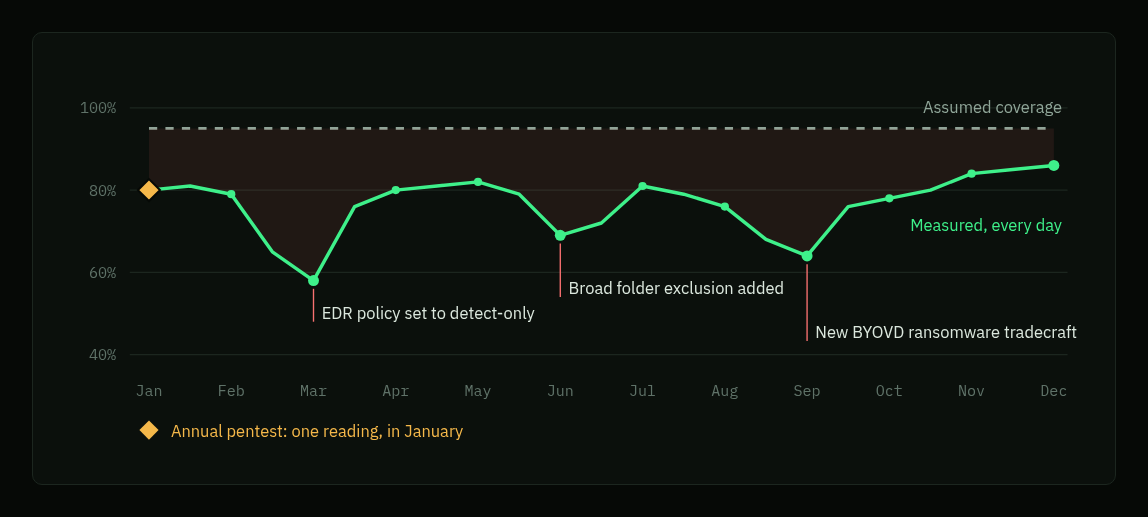
Illustrative data.
Three kinds of change do most of the damage:
- Policy changes. Block mode becomes detect-only during an incident or after a performance complaint.
- Exclusions. A broad folder exclusion fixes a slow application, and every binary in that folder becomes invisible to the sensor.
- New tradecraft. A ransomware group starts loading a vulnerable signed driver (BYOVD) to kill the sensor, a technique your policy was never tuned for.
An annual penetration test describes the environment on the day it ran. Everything that changes afterwards goes unmeasured until the next one. Continuous validation re-runs the same techniques on a schedule, so drift shows up within a day instead of within a year.
Measure What Happens, Not What's Installed
Achilles has three parts:
- A test library of about 65 tests mapped to ATT&CK, synced from Git. Most of them (44) are multi-stage chains built from published threat intelligence, such as Akira's BYOVD chain, SafePay's UAC bypass, EDRSilencer and a macOS infostealer. Another 10 cover MITRE's top 10 ransomware techniques, from PowerShell and WMI execution to deleting backups and encrypting files. The other 12 are configuration bundles that check CIS and identity baselines control by control.
- A small Go agent for Windows, Linux and macOS. It never listens on a port, so it works behind NAT and strict firewalls. Before running a test it checks the binary's SHA-256 and size against the console's record; Windows builds are also Authenticode-signed with your certificate when one is configured.
- A console that schedules runs, stores every result in Elasticsearch, and pulls alerts from your EDR.
Each test performs the technique for real, in a contained way, and exits with a code. 101 means it ran to completion; 105, 126 and 127 mean something quarantined or blocked it. Multi-stage tests report every stage separately, so you see how far an attack gets, not just whether it was noticed.
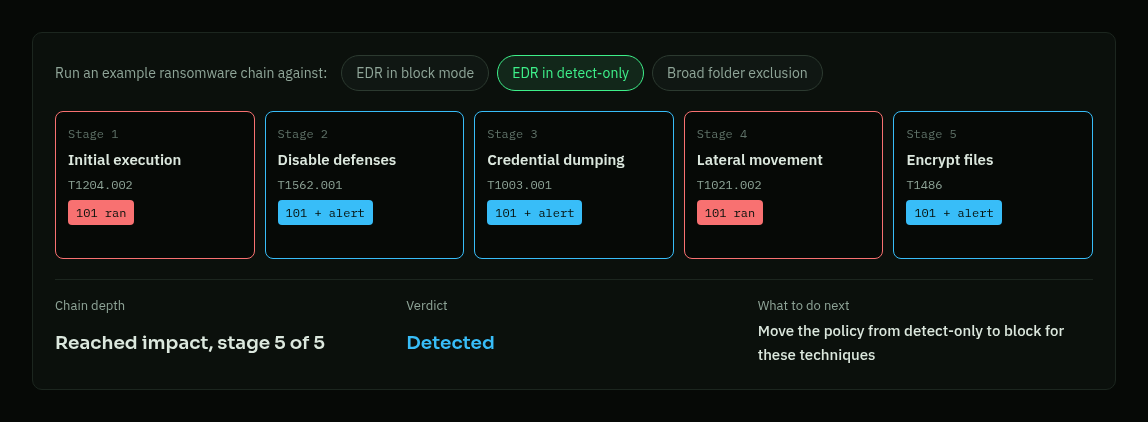
This illustrative example is a five-stage ransomware chain against an EDR in detect-only mode. Every stage ran. Three raised alerts, so the SOC would have seen them, but nothing stopped the chain before it reached encryption. With the same EDR in block mode, this chain is stopped at stage 2. It's the same product and the same test; one setting is the only difference.
“Detected” Is Not “Blocked”
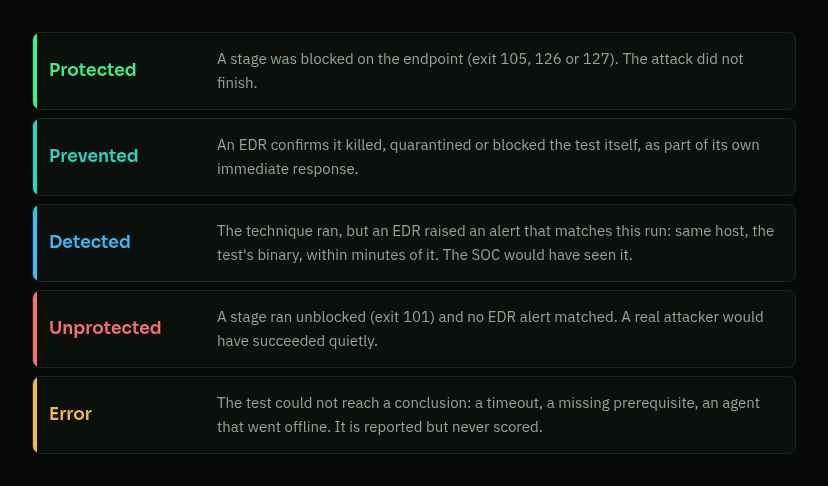
The exit code says what happened on the endpoint. EDR alerts say what the SOC saw. Achilles combines both and keeps the strongest result, so every run lands on exactly one verdict.
The line between Detected and Protected matters. A detection gives an analyst a chance to respond, which beats silence. But it depends on someone acting in time, on the right alert, possibly at 3 a.m. That's why the Defense Score, which counts both blocked and EDR-confirmed results, comes with a stricter blocked-only score next to it. When the two numbers are far apart, your defense depends on people more than on controls.
Errors, such as a timeout or a missing prerequisite, are reported but never scored, so a broken test can't make you look better or worse than you are.
Matching an Alert to the Test That Caused It
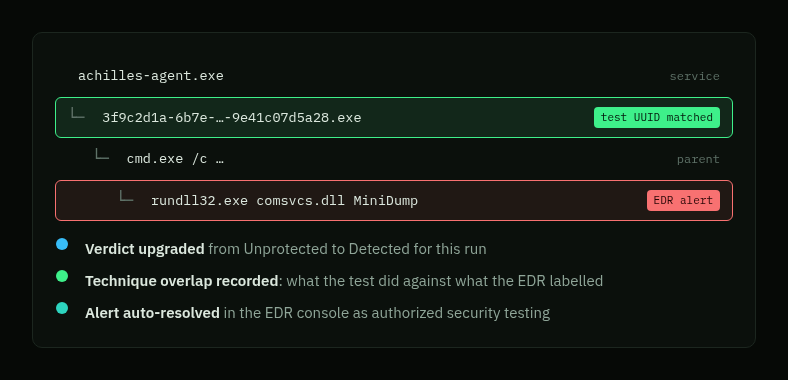
EDR alerts rarely fire on the test binary itself. They fire on the Windows program it started: cmd.exe, rundll32.exe, powershell.exe. Test binaries are named after the test's UUID, so Achilles looks for that name in the evidence the EDR attaches to the alert: the triggering process, its parent and grandparent where the EDR reports them, and file paths. An alert is linked when it is on the same host, inside the run's time window, and that UUID shows up in its evidence.
Once an alert is linked, three things happen:
- The run's verdict is upgraded, for example from Unprotected to Detected. A stage gets its own Detected label when the evidence names that stage's binary.
- The technique the EDR labelled is compared with the one the test actually performed.
- If you turn it on, the alert is closed in the EDR console as authorized security testing, so a daily schedule doesn't flood the SOC queue. Auto-resolve has a dry-run mode, and it never edits test results.
Scored on Your Current State
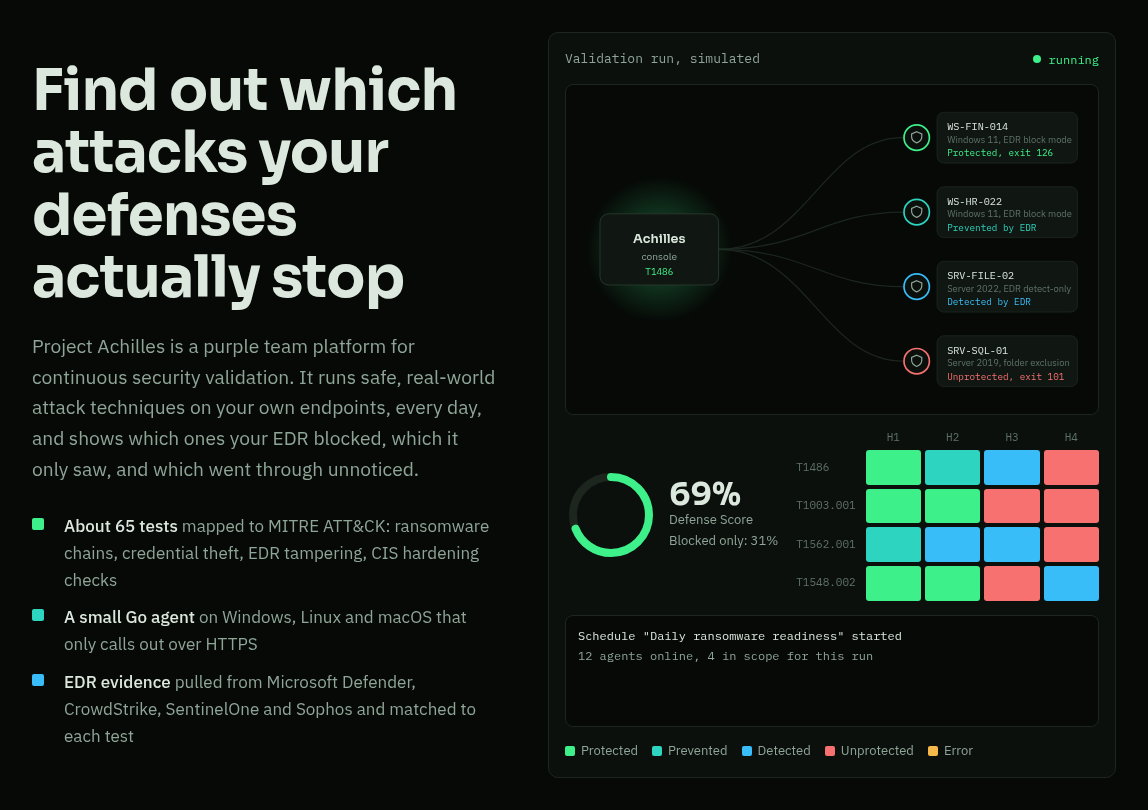
The Defense Score keeps only the latest conclusive result for each test and host pair. Fix a gap and the score moves the next time that test runs, instead of being diluted by months of old failures. Around the score, Analytics breaks results down by ATT&CK tactic, by how far each attack chain got, by threat actor, and over time, next to Microsoft Secure Score or your EDR's own posture score.
When the business decides to accept a gap, you can exclude it from the headline score. The unadjusted series stays alongside it, so an accepted risk is a decision on the record, not a gap that disappeared.
Red-Team Principles, Run Every Day
| Principle | What Achilles does |
|---|---|
| Emulate the adversary | Intel-driven chains reproduce current groups' tradecraft stage by stage, including driver abuse and EDR tampering. |
| Assume breach | Tests start from code already running on an endpoint, where the EDR is the last line of defense. |
| Measure outcomes | Every run ends in one verdict, from exit codes plus matched EDR evidence. |
| Repeat continuously | Schedules and campaigns re-run the library; the score reflects the latest result per host. |
| Close the loop with blue | Pre-execution notices, alert correlation and auto-resolve put red activity and blue telemetry side by side. |
What Changes for the SOC and for Risk Owners
For security operations:
- Every Unprotected technique is a concrete detection gap, with the exact host, binary and time needed to reproduce it.
- A fix is proven, not assumed: change the policy, re-run the test, watch the verdict change the same day.
- Regressions from a sensor update, a new exclusion or a policy rollback show up as a score drop, with Slack or email alerts when it crosses a threshold.
For risk owners:
- Control effectiveness becomes a measured statement ("ransomware chains are stopped before encryption on 85% of hosts"), re-measured every week.
- Threat-actor coverage shows, for each group your test library emulates, how many of its tests got through on your hosts today.
- Campaigns produce a tests-by-hosts evidence matrix, CSV exports and print-ready execution reports for auditors and the board.
Running Attacks in Production, Safely
Running offensive techniques on real endpoints only works if the platform is safe to operate. With pre-execution notices on, tests are held on the server until the security team's email has been accepted, plus a lead time you choose. Test binaries are hash-checked against the console's record before they run, from a work folder locked to SYSTEM and Administrators. Four roles separate read-only users from operators and admins. Inside an install, results are scoped to each organization; for full separation, run one install per organization. No API key can create users or more keys.
See It in Motion
The stills above are frames from an interactive explainer that walks through the whole loop: tests running against endpoints, a ransomware chain you can re-run against three EDR configurations, verdicts, posture analytics and alert matching. Open it on the docs site.
When you're ready to measure your own environment, Install Project Achilles in 30 Minutes walks you through it from zero.